

How to Redeem Roblox Codes
Roblox promo codes gift players free in-game bonuses, accessories and items. Redeeming codes takes less than a minute, but many players don’t know where to enter them. In this guide, you’ll learn how to redeem Roblox codes step-by-step, where to find new working promo codes and why some codes don’t work
What Are Roblox Codes?
Roblox codes are special reward codes created by Roblox or game developers. They gift free avatar items, boosts, limited accessories and in-game currency.
Codes are usually shared:
- By game developers inside Roblox experiences
- On official Roblox social pages
- During special events
How to Redeem Roblox Promo Codes Step-by-Step
Step 1 — Open the Official Redeem Page
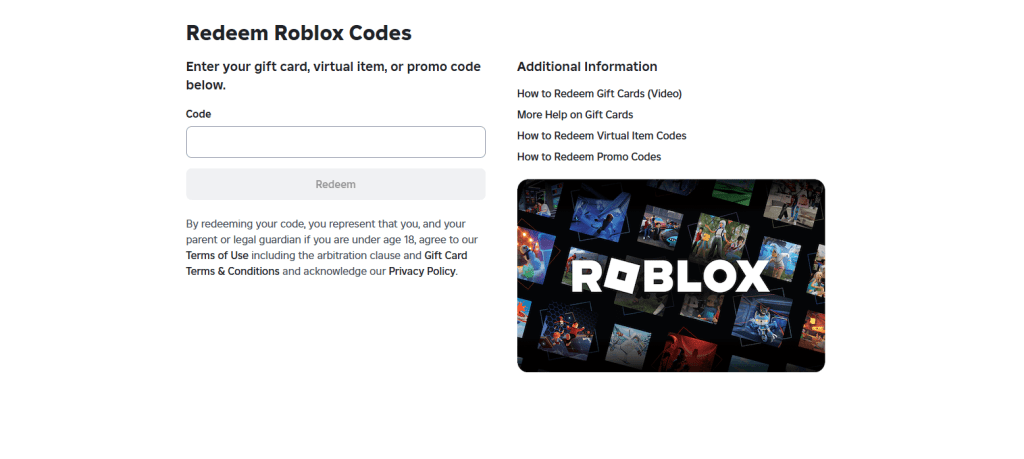
Go to the official Roblox code redemption page:
https://www.roblox.com/promocodes
Log in to your Roblox account if required.
Step 2 — Enter the Code
1. Click the text box
2. Type or paste your promo code
3. Press Redeem
If the code is correct and valid, you’ll see a success message.
Step 3 — Watch Your Reward in Roblox
- After redeeming:
- Open Avatar Editor
- Go to Inventory
- Equip your new item
Your reward is collected
Where to Find Working Roblox Codes
- On our website RBXguide.net – we update working Roblox codes daily
- On official Roblox pages
- On developer Discord servers
- On social media announcements
Why Is My Roblox Code Not Working?
Here are the most common reasons:
Code Already Redeemed
Code Expired
Typing Mistake
Region Restriction
sometimes codes works only in specific country
FAQ
Can Roblox codes gift me Robux?
- No. Official promo codes give items or accessories, not free Robux
Can I redeem Roblox codes on mobile?
Yes. The codes redemption page works for both mobile and PC browsers
How often are new codes released?
During holidays, events, and game updates.
Related Roblox Guides
How to Turn On Voice Chat in Roblox
Top Roblox Games